

クロノグラフの0点調整の方法

How to adjust the 0 point of a chronograph

2019年6月14日

■OnePoint advice!

The chronograph hand should normally be pointing at the 0 o'clock position (directly above). This needle has shifted and won't return!
We often receive inquiries like this.
but! Actually this.
Most cases can be easily fixed with settings.♪

https://www.youtube.com/watch?v=fgYkXkLYOqM

■Why does it shift?

During use, the chronograph hands may become misaligned due to shock or magnetic interference.
There are also cases where the customer may have moved it themselves without realizing it.
If this reference position shifts, it will not return to the 0 position no matter how many times you reset it.

■Can this be fixed?

Most quartz models have zero point adjustment.
However, there are many mechanical models that cannot be modified.
For models that can be modified, please check the attached manual for instructions on how to modify it.

■Information on how to correct

The repair method varies depending on the model, but this time we will show you how to repair TISSOT quartz.♪

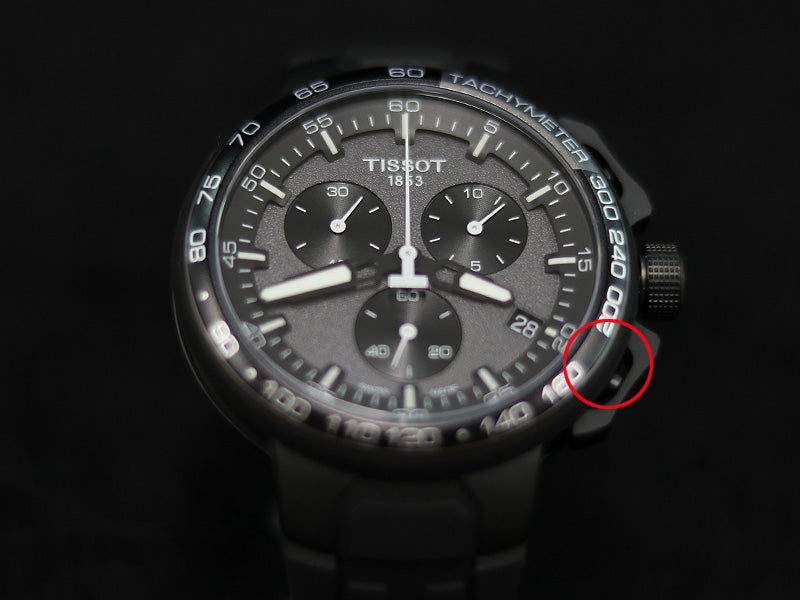
The chrono hand is out of alignment.

Pull the crown out to one notch.

Press the button on the top right.

When you press the button on the top right, the needles circled in red will go around the needle.

Press the bottom right button.

Once it has completed one rotation, press the button on the bottom right and the needle will move. It moves each time you press it, but if you keep pressing it, it moves continuously. Set it to the 12 o'clock position (directly above).
When you press the button on the top right, the needle in the red frame will move around once and you will be able to adjust it.
As before, press the bottom right button to move it to the 12 o'clock position (directly above).
When you press the button on the top right, the needle in the red frame will move around once and you will be able to adjust it. Then press the bottom right button in the same way and align it to the 12 o'clock position (directly above).
All hands are now at the 12 o'clock position (directly above). The settings are now complete. After that, please actually perform the operation and reset it to see if it returns properly.
faq